


Screen calls by service area
A polite “we don’t cover that area” beats a wasted trip.
Our Secretary checks the address against the coverage rules you set before offering a service appointment. If it falls outside the boundary, it explains that plainly and can take a message for your team to review an exception—without promising a visit.


A ready caller may be out of range
A caller can be ready to book and still be outside your working area. Without a clear boundary check, your team may spend time on a visit you cannot take—or turn away a request that deserves staff review.
One call, start to finish.
A fictional business and caller, so you can compare it with how your own line works today.
Faucet repair visit booked
- Caller
- Maya Ellis · (407) 555-0142
- Service
- Faucet repair
- Address
- 418 Alder Street, Brookfield
- Appointment
- Tuesday · 10:30 AM
- Status
- Booked
The appointment is added to the connected calendar. Your team can see the address, service, caller details, and call record.
How receptionist settings works →Outside the boundary? Send it for review
When an address falls outside your approved area, Our Secretary explains the boundary and can take a message for your team. The team decides whether to make an exception; no visit is promised.
Review out-of-area request
- Caller
- Jordan Lee · (407) 555-0188
- Address
- 92 Juniper Lane, Easton
- Request
- Sink replacement · staff review requested
Your rules. Your call.
Everything below lives in your dashboard. Change it any time, then place a test call before it goes live. How setup works →
- Approved coverage
Enter the places your business serves and how to handle addresses outside those rules. Keep exception decisions with your team.
- Services to book
Set the services callers can request, their durations, and staff assignments. Your receptionist can offer only the services you configure.
- Calendar availability
Connect Google Calendar, Cal.com, or Calendly to offer real openings. Calendly requires an eligible paid account.
- Exception handoff
Choose the details your receptionist should collect for an out-of-area request, such as the caller’s name, number, address, and service.
- Call forwarding
Use a new number or forward your business line, where your carrier supports it. Forwarding can be tested and reversed.
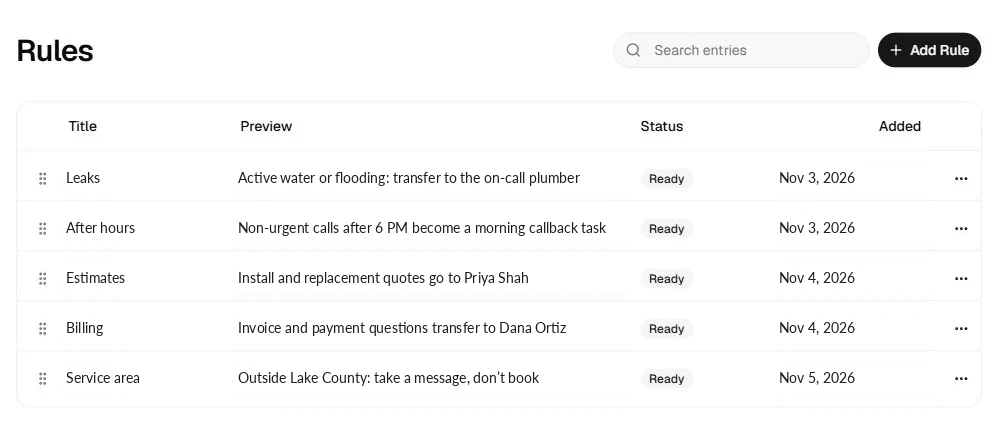
What lands on your desk.
The coverage result
See whether the caller’s address matched your approved area, alongside the call outcome and details collected.
A review task
For an out-of-area exception, your team gets a callback task with the caller’s request and contact details.
The call record
Review call history and transcripts. Recordings are available where enabled.
Questions owners ask
Straight answers about how it works on your line.
How does the receptionist decide whether an address is in range?
Can it book a caller who is within our service area?
What happens when an address is outside our area?
How will we hear about an exception request?
Your next question.

Your business can sound this good too.
Set the areas you serve and the path for exceptions. Our Secretary can check the address before your team commits to a visit.
