


Reschedule appointments by phone with AI
Moving an appointment should sound easy.
A caller can move a booked visit without asking your team to stop what they’re doing. Our Secretary verifies the appointment, checks the connected calendar and confirms the new time only when your rules allow; unclear requests become a callback task instead.


A small change can interrupt the day
Your team may be out on a job when a customer calls to move a routine booking. Without a verified match and an open slot, the request needs a clear handoff—not a guess.
One call, start to finish.
A fictional business and caller, so you can compare it with how your own line works today.
Kitchen design consultation moved
- Customer
- Elena Park
- Service
- Kitchen design consultation
- Previous time
- Thu, May 14 · 10:00 AM
- New time
- Fri, May 15 · 2:00 PM
- Status
- Updated in connected calendar
A change is confirmed only after caller verification and when the configured rules and connected calendar allow it.
See it in a real workflow: home inspection companies →When the booking is unclear
If Our Secretary can’t match a caller to a specific appointment, it won’t change the calendar by guesswork. It takes the details and creates a callback task for your team.
Confirm appointment before changing
- Customer
- Daniel Cho · (312) 555-0126
- Request
- Reschedule a consultation next week
- Next step
- Your team to confirm the booking
Your rules. Your call.
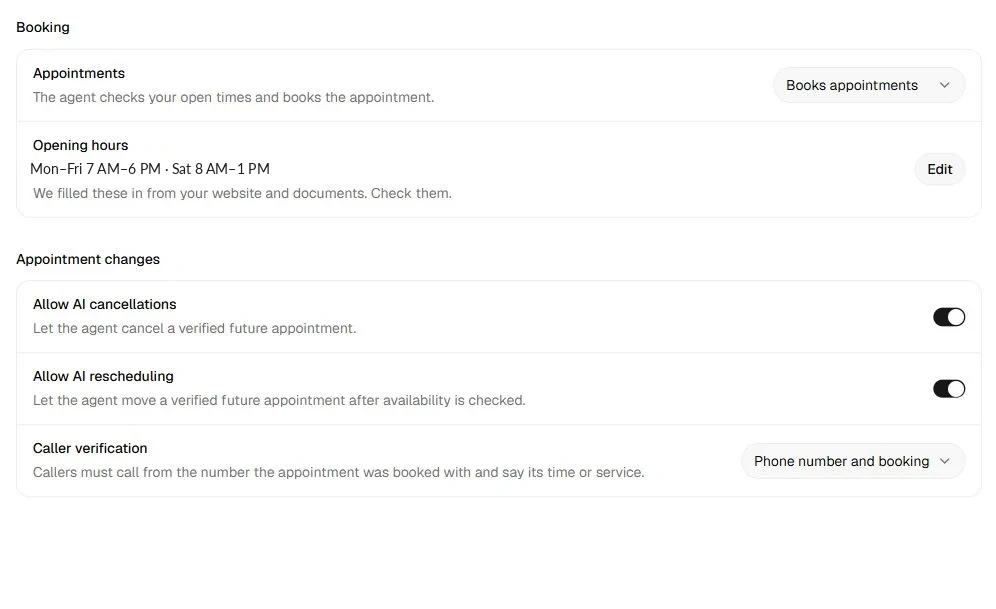
Everything below lives in your dashboard. Change it any time, then place a test call before it goes live. How setup works →
- Connect your calendar
Connect Google Calendar, Cal.com or Calendly so Our Secretary can check real availability. Calendly requires an eligible paid account.
- Set change permissions
Choose whether rescheduling and cancellations are allowed, and when a request needs your team. Our Secretary only completes changes that fit those rules.
- Define verification
Set the details your receptionist should confirm before changing a booking. Requests it can’t confidently match become callback tasks.
- Choose appointment details
Configure services, durations and staff assignments so the calendar check reflects how your business books.
- Set call handling
Choose your greeting, hours and forwarding rules. Forwarding depends on carrier support and can be tested and reversed.
What lands on your desk.
Completed calendar changes
See the customer, service, previous time and new time for a change Our Secretary completed.
Requests needing a person
Review callback tasks with the caller’s details and the reason the requested change could not be completed.
Call context
Review call outcomes and transcripts, plus recordings where enabled, alongside appointments and tasks.
Questions owners ask
Straight answers about how it works on your line.
Can callers reschedule without talking to our team?
What happens if the caller or appointment is hard to verify?
What calendar do we need to connect?
Can we get an alert when someone asks to move an appointment?

Your business can sound this good too.
Let routine, verified changes follow your calendar rules. When a request needs judgment, your team gets the context to take it from there.
