


Customize your AI receptionist
Your greeting, your rules, your sound.
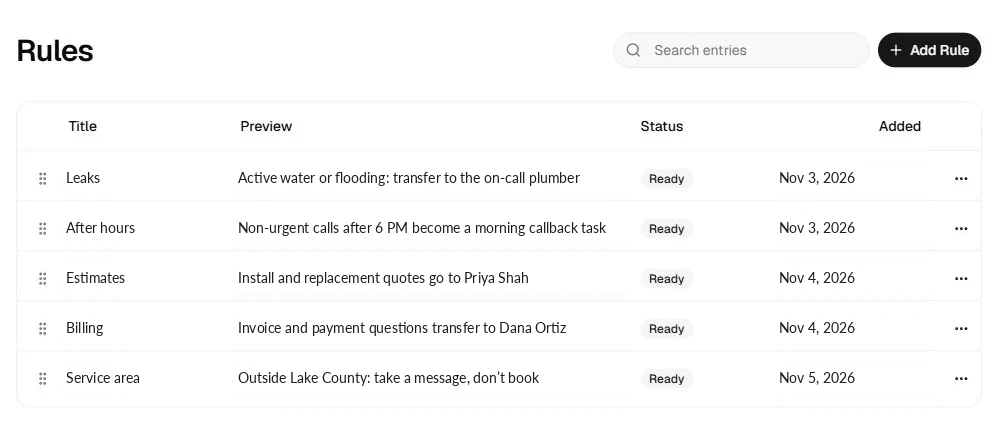
Choose the greeting callers hear, set open hours and holiday closures, and decide which services your receptionist can book. Add rules for transfers, messages and questions it should route to your team, then place a test call before you publish changes.


Your call flow should fit your day
A greeting that promises the wrong service or offers times your team cannot take creates extra follow-up. Set the hours, booking options and handoff rules your team actually uses, and test the caller experience before making changes live.
One call, start to finish.
A fictional business and caller, so you can compare it with how your own line works today.
Drain clearing appointment
- Caller
- Maya Ortiz
- Callback
- (407) 555-0142
- Service
- Drain clearing
- Address
- 18 Willow Street
- Appointment
- Tuesday, 10:30 AM
The owner tested the greeting, service details and connected calendar before publishing the changes.
See it in a real workflow: service-area screening →When the requested time is unavailable
If the calendar has no suitable opening, your receptionist can offer another option or take a callback request. Your team gets the caller's details and what they need, so they can follow up.
Find another appointment time
- Caller
- Maya Ortiz
- Callback
- (407) 555-0142
- Request
- Drain clearing after 4 on Tuesday
Your rules. Your call.
Everything below lives in your dashboard. Change it any time, then place a test call before it goes live. How setup works →
- Greeting and voice
Write the opening words callers hear and choose from 22 voices. Set an opening-language preference; the receptionist can switch languages during a call when the caller speaks another supported language.
- Hours and closures
Set when calls are handled and add holiday or other closures. Choose how calls should be handled outside those hours.
- Services and calendar
Add bookable services, durations and staff assignments, then connect a calendar so appointments use real availability. Supported options are Google Calendar, Cal.com and Calendly with an eligible paid account.
- Questions and handoffs
Add approved answers from your website, documents or manual entries. Set rules for transfers and messages; when a verified answer is not available, the receptionist takes a message and creates a callback task.
- Test before publishing
Call your receptionist to try the greeting, service choices, hours and handoff rules. Adjust the setup and test again before changes go live.
What lands on your desk.
The call outcome
See whether the caller booked, left a message, requested a callback or was transferred.
Useful call context
Review call history, transcripts, contacts and recordings where enabled, along with the caller's request and details.
Tasks to follow up
Callback tasks include the context your receptionist collected. Your team can review and mark tasks complete in the dashboard.
Questions owners ask
Straight answers about how it works on your line.
Can I test a greeting and call rule before it goes live?
What do I need to book appointments?
Can I use my current business number?
How will my team receive messages and callback tasks?

Your business can sound this good too.
Set the call flow your team wants callers to hear. Test it, make adjustments and publish when it fits.
