


Multilingual answering service
Every caller hears their own language.
A caller can hear your configured opening greeting, then continue in another supported language when they speak it or ask to switch. Our Secretary answers from approved business details, books only open calendar times, and leaves your team an English note when a detail needs confirmation.


A language request should not stall a booking
Your opening greeting is set to a supported language; it does not lock the whole call to that language. When a caller speaks another supported language, Our Secretary can switch, check approved service details, and follow your booking rules.
One call, start to finish.
A fictional business and caller, so you can compare it with how your own line works today.
Move-out cleaning booked
- Name
- Elena Ruiz
- Service
- Move-out cleaning
- Appointment
- Thursday, 10:30 AM
- Service address
- 1842 Alder Street, Orlando
- Callback number
- (407) 555-0142
Verified sample: Juniper House Cleaning has approved move-out cleaning details, and its connected calendar shows Thursday at 10:30 AM. A Spanish-language call does not promise that the on-site crew speaks Spanish.
See it in a real workflow: demo →When the caller needs a team answer
A language switch changes the conversation with your receptionist, not what your team or on-site staff can provide. If the business has not confirmed an answer, Our Secretary takes the caller’s details and creates a callback task with an English note.
Confirm language preference with caller
- Name
- Marta Díaz
- Callback number
- (407) 555-0186
- Request
- Confirm whether assigned cleaner speaks Spanish
Same caller. Two setups.
The “theirs” half is a dramatization. The Our Secretary half will use real product audio from a configured test workspace.
Every caller hears their own language.
Nobody should have to repeat their address three times. Our Secretary speaks clearly, confirms names, addresses and times back to the caller, and can switch to the caller’s language during the call.
Sorry, could you repeat that?…
I did not get the address. Can you spell it again?
Showing request · 5:45 PMYour rules. Your call.
Everything below lives in your dashboard. Change it any time, then place a test call before it goes live. How setup works →
- Choose the opening greeting
Select a supported opening-language setting and write the greeting callers hear first. A later language switch can still happen during the call.
- Approve service details
Add the services, hours, and answers your receptionist can rely on. If a caller asks about something not confirmed there, it takes a message instead of guessing.
- Connect your calendar
Set services, durations, staff assignments, and real availability. Our Secretary offers only open times or takes a callback request when none fit.
- Set team handoffs
Choose when to transfer a call and where it should go. If the destination does not answer, Our Secretary takes a message and creates a callback task.
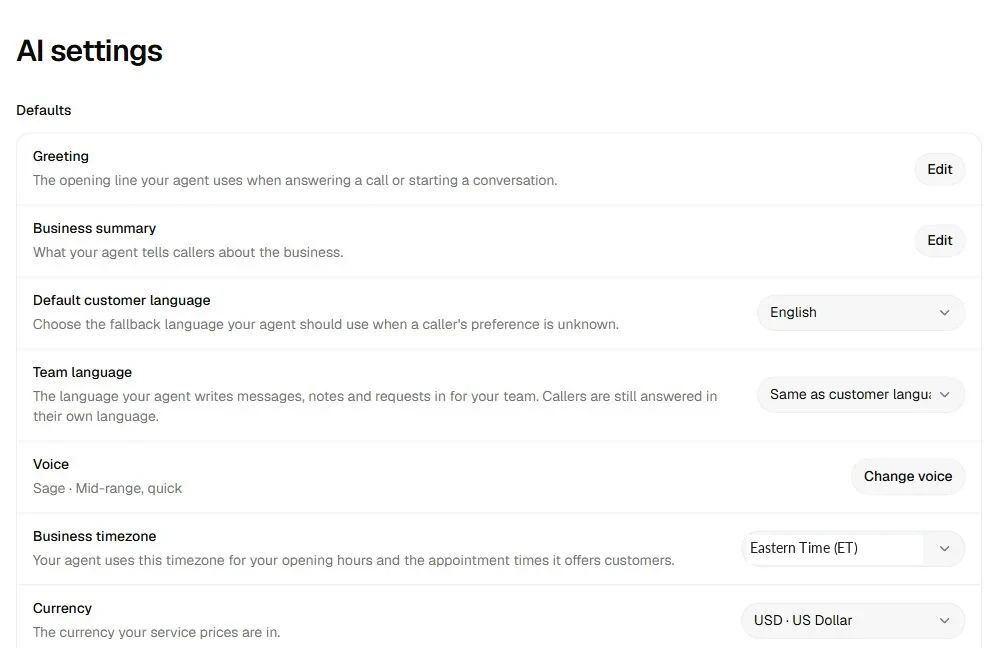
What lands on your desk.
The call outcome
See whether the call ended with a booking, transfer, message, or callback task in the dashboard.
An English team note
Callback tasks include an English note with the caller’s request and the details your team needs to follow up.
Call history
Review outcomes and transcripts, plus recordings where enabled. Your team can mark tasks complete in the dashboard.
Questions owners ask
Straight answers about how it works on your line.
Can I choose the language callers hear first?
Does switching languages mean my crew speaks that language?
Can it book after a caller switches languages?
Can I use my current number and receive text alerts?
Your next question.
Your business can sound this good too.
Set the opening greeting, approve the service details, and connect your calendar. Callers can ask to continue in another supported language without changing the booking rules your team relies on.
