


AI receptionist for salons and spas
Your salon can sound this good too.
When foils are in and the front desk is occupied, Our Secretary can answer the call, confirm the configured service, and check the connected calendar for an assigned stylist’s real availability. It books only an open fit; a requested cancellation or move waits for caller verification and your settings before it is changed.


A busy chair shouldn't stall the schedule
A guest calling during a color service still needs to know whether a specific stylist can fit the service and how long to set aside. Our Secretary checks configured services and connected calendar availability; it doesn’t treat a requested cancellation or move as complete until the caller is verified and the settings allow the change.
One call, start to finish.
A fictional business and caller, so you can compare it with how your own line works today.
Root touch-up + blowout booked
- Guest
- Nora Bell
- Service
- Root touch-up + blowout
- Staff
- Maya
- Date & time
- Tuesday, June 16 · 10:30 AM
- Callback number
- (312) 555-0186
Maya's calendar showed an open time for the configured service while the front desk was occupied.
How appointment changes works →A requested move is not a completed change
Our Secretary changes or cancels a booking only after caller verification and when your settings and connected calendar allow it. If it cannot verify the booking or the request is unclear, it leaves the appointment unchanged and sends your team a callback task to review.
Review appointment move request
- Guest
- Nora Bell
- Request
- Move color appointment earlier
- Status
- Appointment unchanged; team review needed
Your rules. Your call.
Everything below lives in your dashboard. Change it any time, then place a test call before it goes live. How setup works →
- Services and durations
Add the services guests can book and how long each appointment takes. Our Secretary uses these settings when checking available times.
- Staff assignments
Choose which team members can be booked for each service. Connect their calendars so availability reflects the schedules you use.
- Calendar connection
Connect Google Calendar, Cal.com, or Calendly. Calendly requires an eligible paid account.
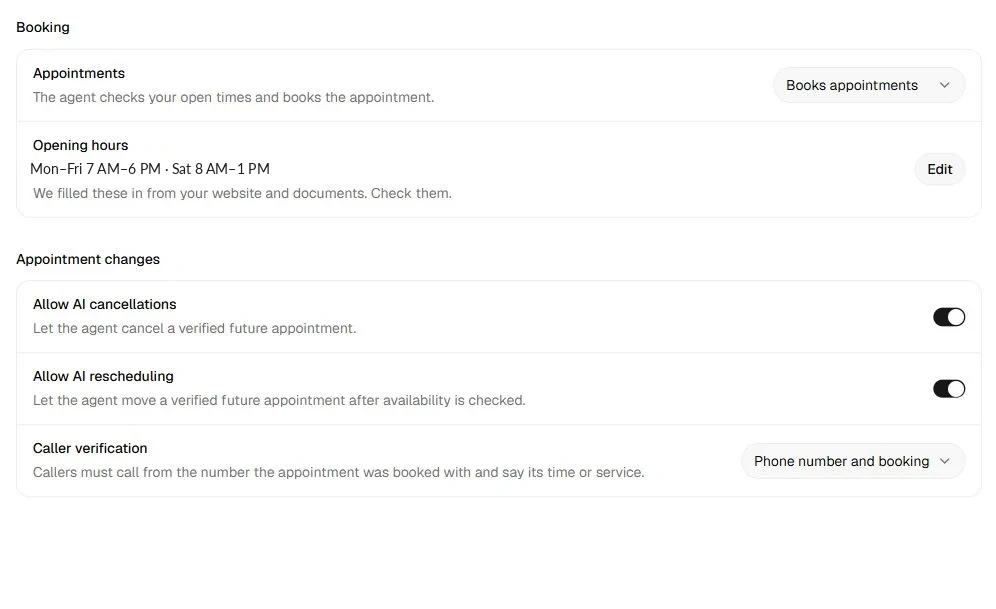
- Change permissions
Set whether cancellations and moves are allowed and what verification is required. Requests that are unclear or cannot be completed become tasks for your team.
- Hours and call rules
Set your greeting, hours, closures, routine answers, and when calls should transfer to your team or become callback tasks.
What lands on your desk.
The booking details
See the guest, configured service, assigned staff member, time, and call outcome in your dashboard.
Change requests for review
When a move or cancellation cannot be verified or completed under your settings, your team sees a task with the caller's request and context.
A record of the call
Review call history, transcripts, contacts, appointments, and tasks. Recordings are available where enabled.
Questions owners ask
Straight answers about how it works on your line.
Can it book a particular service with a particular stylist?
Can it cancel or move an existing salon appointment?
Can I keep my salon or spa phone number?
What happens when no appointment fits or the front desk is busy?
Your next question.
Back to Shops & studiosShops & studiosRead more → The workflowAppointment scheduling
Callers hear real openings, choose a time, and get a clear confirmation—or a callback path.
Read more → The feature you set upAppointment changes
Verified changes go to the calendar; unclear requests go to your team.
Read more → Also in Shops & studiosAuto repair
Capture the vehicle and requested work, then offer a configured drop-off slot.
Read more →Your salon can sound this good too.
Set your services, staff, and change rules, then test a call before forwarding your salon or spa line.
